> For the complete documentation index, see [llms.txt](https://docs.stylemixthemes.com/llms.txt). Markdown versions of documentation pages are available by appending `.md` to page URLs; this page is available as [Markdown](https://docs.stylemixthemes.com/motors-theme-documentation/installation-and-activation/stylemix-license.md).

# Stylemix License

The Motors theme can be purchased in two different ways:

<table data-card-size="large" data-view="cards"><thead><tr><th align="center"></th><th></th><th data-hidden data-card-target data-type="content-ref"></th><th data-hidden data-card-cover data-type="image">Cover image</th></tr></thead><tbody><tr><td align="center">StylemixThemes <strong>(with lifetime support)</strong></td><td>Purchased from the <a href="https://stylemixthemes.com/motors/"><strong>official website</strong></a> of the Motors theme. The <strong>most convenient way</strong> to get the theme with regular bonuses and discounts, and premium support. <strong>Freemius</strong> manages subscriptions.</td><td><a href="https://stylemixthemes.com/motors/">https://stylemixthemes.com/motors/</a></td><td data-object-fit="contain"><a href="/files/p6Y444LxGndg7PQX2vKu">/files/p6Y444LxGndg7PQX2vKu</a></td></tr><tr><td align="center">Themeforest <strong>(expandable Envato support)</strong></td><td>Purchased from the theme's official page on Envato's <a href="https://themeforest.net/item/motors-automotive-cars-vehicle-boat-dealership-classifieds-wordpress-theme/13987211">Themeforest.net</a>, like any other WordPress theme. It only offers a lifetime plan and <strong>6 months' support</strong> (charges apply for extending).</td><td><a href="https://themeforest.net/item/motors-automotive-cars-vehicle-boat-dealership-classifieds-wordpress-theme/13987211">https://themeforest.net/item/motors-automotive-cars-vehicle-boat-dealership-classifieds-wordpress-theme/13987211</a></td><td data-object-fit="contain"><a href="/files/HIu1Vdq22Bk0vQDXxg3R">/files/HIu1Vdq22Bk0vQDXxg3R</a></td></tr></tbody></table>

{% hint style="success" %}
In this manual, we will learn how to download and install the theme properly via the **StylemixThemes website (via Freemius)**.

***

If you need install & activate manuals for **Themeforest**, refer to [**this manual**](/motors-theme-documentation/installation-and-activation/themeforest-license.md).
{% endhint %}

## Purchase

In this way, we will purchase the theme from <https://stylemixthemes.com/motors/>:

{% stepper %}
{% step %}
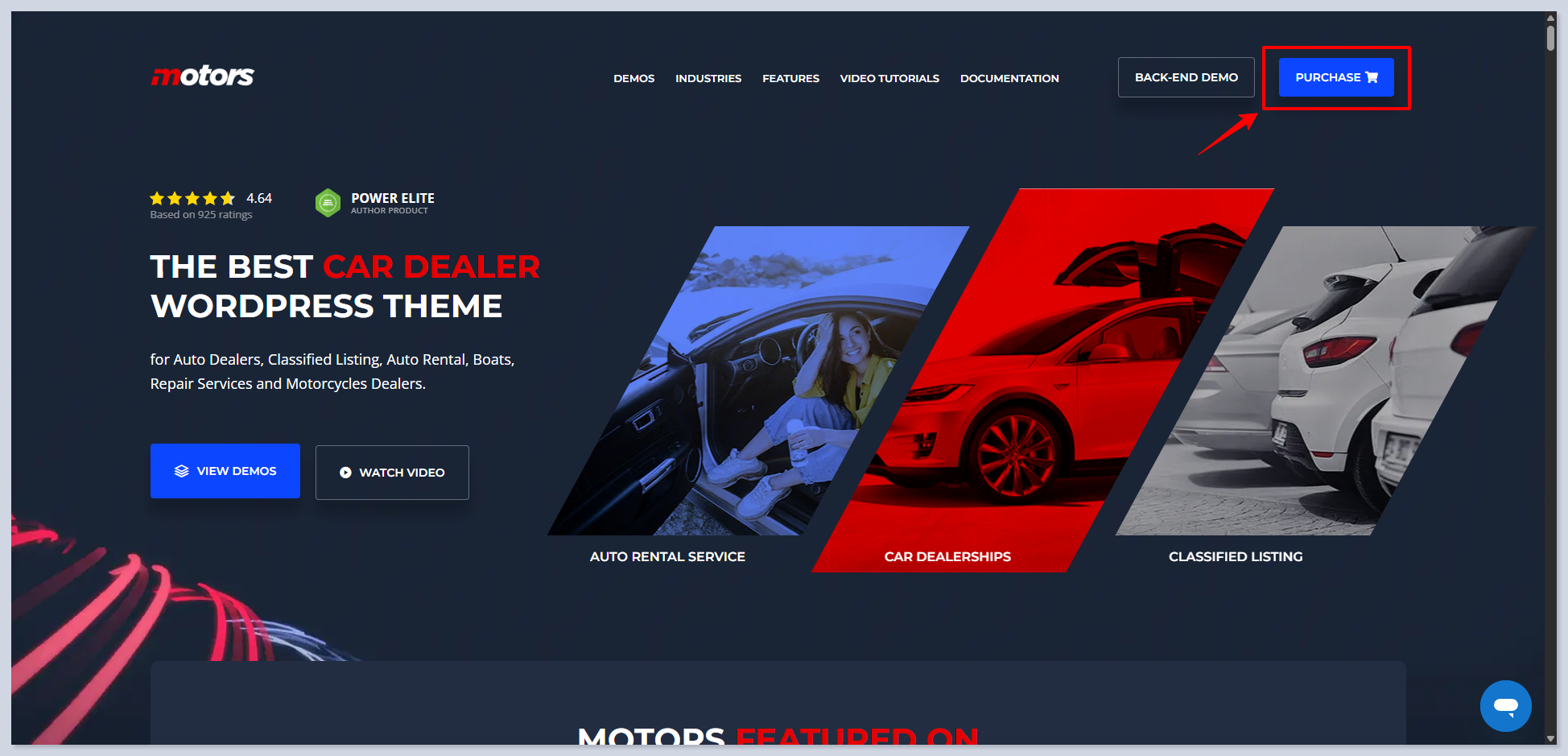
On the homepage, click on the <kbd>Purchase</kbd> button:

<figure><img src="/files/1XJGCOdL0xoAHnVq7Fs3" alt=""><figcaption></figcaption></figure>
{% endstep %}

{% step %}
Fill out the checkout form and apply any coupons if you have them.

{% hint style="warning" %}

#### <mark style="color:$warning;">**IMPORTANT**</mark>

Be **careful to enter your email address.** The activation key and sign-in credentials to your StylemixThemes (Freemius) account will be sent to this email address. Entering the wrong email address causes problems.
{% endhint %}

<figure><img src="/files/MacVGl4yWkt4YLBQGG9n" alt=""><figcaption></figcaption></figure>
{% endstep %}

{% step %}
Success message-pop confirms the purchase:

<figure><img src="/files/Py9o0DM1bv57XykoIEPP" alt=""><figcaption></figcaption></figure>
{% endstep %}

{% step %}
At the same time, you receive an email with an invoice, download & install instructions, credentials to enter your StylemixThemes account, and your activation key

{% hint style="info" %}
The activation key can be found in your StylemixThemes account anytime.
{% endhint %}

<figure><img src="/files/yXT0VnSRsxDXTaUyHlTM" alt=""><figcaption></figcaption></figure>
{% endstep %}
{% endstepper %}

## Download and Install

You can download the theme from the first email that you receive, or anytime from the StylemixThemes account.

{% stepper %}
{% step %}
Go to <https://stylemixthemes.com/account/> and sign in with your credentials.
{% endstep %}

{% step %}
Move to the **Downloads** tab and click on the <kbd>Download</kbd> button next to the **Motors theme**:

<figure><img src="/files/vUeoBDQxMeEcEEtw9jMj" alt=""><figcaption></figcaption></figure>
{% endstep %}

{% step %}
The theme file starts downloading, and at the same time, you can find your license key to activate the theme; **copy** it:

<figure><img src="/files/Ndbb6XuNOd7kOK0THULv" alt=""><figcaption></figcaption></figure>
{% endstep %}

{% step %}
In your fresh WordPress site dashboard (backend), go to **Appearances > Themes > Add Theme:**

<figure><img src="/files/XA0yCQH3H9ywAPJ11DzM" alt=""><figcaption></figcaption></figure>
{% endstep %}

{% step %}
Click on <kbd>Upload Theme</kbd>, then choose the downloaded `.zip` file of the theme. After the selection, click on the <kbd>Install Now</kbd> button:

<figure><img src="/files/7E4UXOQIPDpnhb3mGVMJ" alt=""><figcaption></figcaption></figure>
{% endstep %}

{% step %}
Activate the theme:

<figure><img src="/files/Nv4UzMJ0KVLmTBpGcpbA" alt=""><figcaption></figcaption></figure>
{% endstep %}

{% step %}
On the opened page, paste the copied license key and click on the <kbd>Activate Licence</kbd> button:

<figure><img src="/files/TqBrPJjOd7JXLnfwTtWK" alt=""><figcaption></figcaption></figure>
{% endstep %}

{% step %}
You will see the success message confirming the activation:

<figure><img src="/files/61NRs4PaqinwTQBggv9b" alt=""><figcaption></figcaption></figure>
{% endstep %}
{% endstepper %}

## F.A.Q.

<details>

<summary>I did not get the email after the purchase</summary>

If you cannot find your welcome email with login credentials for your StylemixThemes account, click on this link and enter your email address:

{% embed url="<https://stylemixthemes.com/account/#!/password/recover>" %}

You will receive an email with login information. If you still have problems, contact us at <support@stylemixthemes.com>.

***

If you have Motors installed on a WP site already, you can follow **WP Dashboard > Motors > Theme License** and click on <kbd>Can't find your license key?</kbd>, then enter your email:

<figure><img src="/files/L6aoQ19Vj83BiLg3BVv7" alt=""><figcaption></figcaption></figure>

</details>

<details>

<summary>How do I change the license on my site?</summary>

Follow **WP Dashboard > Motors > Motors**. Under the Theme License section, you will find a <kbd>Change License</kbd> button:

<figure><img src="/files/XOSl62OMeeaxEgdOymnf" alt=""><figcaption></figcaption></figure>

</details>

<details>

<summary>How do I deactivate the license key on my site?</summary>

Follow **WP Dashboard > Motors > Motors**. Under the Theme License section, you will find a <kbd>Deactivate Licence</kbd> button:

<figure><img src="/files/213xUNjrYEwZ5JwgSO6d" alt=""><figcaption></figcaption></figure>

</details>


---

# Agent Instructions
This documentation is published with GitBook. GitBook is the documentation platform designed so that both humans and AI agents can read, navigate, and reason over technical content effectively. Learn more at gitbook.com.

## Querying This Documentation
If you need additional information that is not directly available in this page, you can query the documentation dynamically by asking a question.

Perform an HTTP GET request on the current page URL with the `ask` query parameter, and the optional `goal` query parameter:

```
GET https://docs.stylemixthemes.com/motors-theme-documentation/installation-and-activation/stylemix-license.md?ask=<question>&goal=<endgoal>
```

`ask` is the immediate question: it should be specific, self-contained, and written in natural language.
`goal` is optional and describes the broader end goal you are ultimately trying to accomplish on behalf of the user. GitBook uses it to tailor the answer towards what is most useful for that goal.

The response will contain a direct answer to the question and relevant excerpts and sources from the documentation.

Use this mechanism when the answer is not explicitly present in the current page, you need clarification or additional context, or you want to retrieve related documentation sections.
